Snap Turn Provider
A locomotion provider, for providing rotation to the camera using the joystick.
Here is a list of the options:
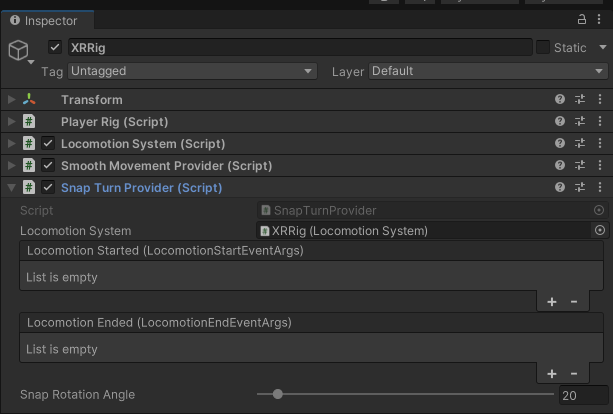
Name |
Explanation |
|---|---|
Locomotion System |
Takes the XRRig locomotion system |
Locomotion Started |
The event invoked when a locomotion has started. |
Locomotion Ended |
The event invoked when a locomotion has ended. |
Snap Rotation Angle |
Determines the angle the rotation snap will be. |
Rotation |
The point the rig rotates around. Camera (default) turns the user in place, wherever they stand in their play area. Rig turns around the rig’s origin, which also moves the user if they have stepped away from it. |
Note
Alternatively, you can use the Smooth Turn Provider, which rotates continuously while the stick is held. It has the same options, except that the angle is replaced by a Rotation Speed in degrees per second. With Automatic Player Rig Setup, the Turn Mode setting of the Interaction System module picks which of the two is used with XR devices; snap turning is the default. The Snap Turn Angle and Smooth Turn Speed settings next to it set the angle or the speed of the chosen mode.
Hint
By default, you can use the analog stick on your right controller to turn your camera (x axis).