Using the Playback UI
Default UI Overview
During playback, there are several things you are able to control:
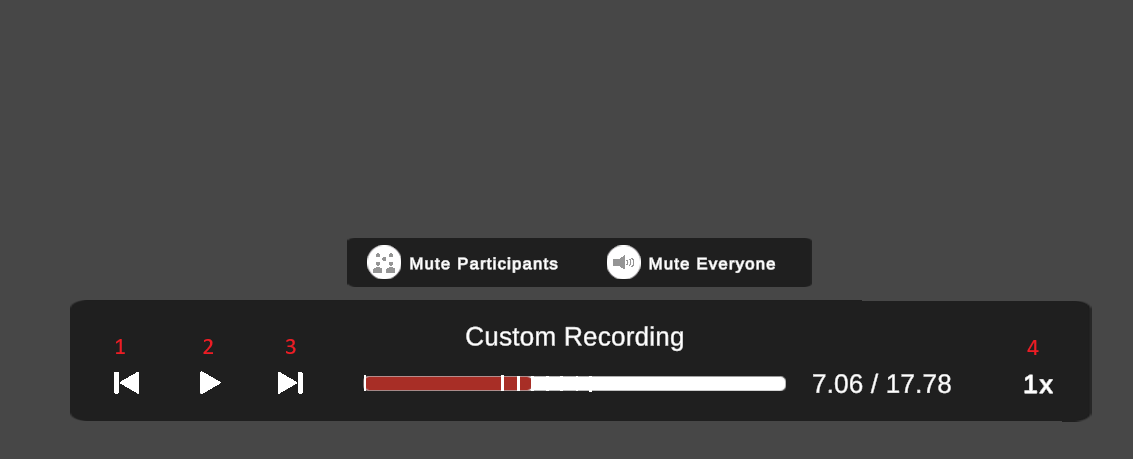
Name |
Function |
|---|---|
1: Seek Back |
Seeks to the previous chapter, if any |
2: Play/Pause |
Stops or Continues playback, depending on direction (4) |
3: Seek Forward |
Seeks to the next chapter, if any |
4: Speed/Direction |
Clicking will cycle the following speeds: 1x, 2x, 4x, 8x, and then backwards for 1x, and 2x. |
5: Pin |
Clicking will toggle pin state: when pinned the UI will not move or turn towards the user. |
The white lines inside of the slider area, indicate the various chapters this recording may have.
Implementing a custom Player UI
The default Player UI can be replaced entirely by your own prefab. Assign it to the Custom Player UI field of the XR Recorder module (see Advanced Settings).
When that field is set, the recorder will not spawn its own UI: once a recording has been
loaded, it instantiates your prefab and sends it the OnCreatorPlayerSpawned message.
var playerUIInstance = Instantiate(customPlayerUI);
playerUIInstance.SendMessage("OnCreatorPlayerSpawned");
This means that your prefab needs a component on its root object with a method named
OnCreatorPlayerSpawned, otherwise Unity will log a “no receiver” error.
Note
The prefab is instantiated as-is. Unlike the default UI, nothing is done for you:
no canvas conversion, no parenting to the camera rig and no follow/look-at behaviour.
For an XR (world space) UI, add a MAGES.WorldSpaceCanvas along with
MAGES.LookAtObject and/or MAGES.FollowObject on the prefab, and for a Mobile3D
build use a regular screen space overlay canvas.
Controlling playback
Everything the UI needs is exposed by the recorder module and by its player instance:
RecorderModule recorderModule = Hub.Instance.Get<RecorderModule>();
Player player = recorderModule.PlayerInstance;
The most useful members of Player are:
Member |
Function |
|---|---|
|
The current position of the playback, in seconds. |
|
The total length of the recording, in seconds. |
|
The current position of the playback, normalized between 0 and 1 (useful for sliders). |
|
The playback speed. Negative values play the recording backwards. |
|
Whether the playback is currently paused. |
|
Pauses or resumes the playback. |
Chapters are queried from the module itself, with ListChapters(), which returns a list of
RecorderModule.ChapterInfo objects, each one holding a Name and the Cursor (in
seconds) it points to.
Example
The following script is a minimal custom player UI, with a play/pause button, a progress slider and a label showing the elapsed and total time:
using MAGES;
using MAGES.Recorder;
using TMPro;
using UnityEngine;
using UnityEngine.UI;

public class MyPlayerUI : MonoBehaviour
{
    [SerializeField]
    private Button playPauseButton;

    [SerializeField]
    private Slider slider;

    [SerializeField]
    private TextMeshProUGUI timeText;

    private Player player;

    // >>> Called by the recorder right after the prefab is instantiated.
    private void OnCreatorPlayerSpawned()
    {
        player = Hub.Instance.Get<RecorderModule>().PlayerInstance;

        playPauseButton.onClick.AddListener(() => player.SetPaused(!player.Paused));

        // >>> Show the chapters of the recording, if any.
        foreach (var chapter in Hub.Instance.Get<RecorderModule>().ListChapters())
        {
            Debug.Log($"Chapter {chapter.Name} @ {chapter.Cursor}");
        }
    }

    private void LateUpdate()
    {
        if (player == null)
        {
            return;
        }

        slider.value = (float)player.Current01;
        timeText.text = $"{player.Cursor:F} / {player.EndRTSS:F}";
    }
}
Note
OnCreatorPlayerSpawned carries no arguments; the title of the recording is not
passed to a custom UI. If you need it, keep a reference to the Recording you handed to
PlayRecordingAsync.
Seeking to chapters
It may be so that with the new UI you’d like to Seek to specific chapters. Below follows a simple coroutine to help you do that:
private MAGES.Recorder.Player player;
private bool isSeekingChapter = false;
private const double ChapterSeekTolerance = 0.05;

private IEnumerator FastSeekToChapter(double targetCursor, bool forward)
{
    // If currently seeking, then don't.
    if (isSeekingChapter)
    {
        yield break;
    }

    // Resume the player with 4x speed:
    // The player still needs to go through all of the events normally. But we can go faster,
    // if we speed it up with CursorRate. Just don't put it over 8x or 10x either way, because
    // this may result in performance loss.
    player.CursorRate = forward ? 4.0 : -4.0;
    player.SetPaused(false);

    isSeekingChapter = true;

    while (true)
    {
        // player.Cursor must be close to targetCursor within tolerance
        if (forward)
        {
            if (player.Cursor >= targetCursor - ChapterSeekTolerance || player.Cursor >= player.EndRTSS)
            {
                break;
            }
        }
        else
        {
            if (player.Cursor <= targetCursor + ChapterSeekTolerance || player.Cursor <= 0.0)
            {
                break;
            }
        }

        // Skip frames until we're done
        yield return null;
    }

    isSeekingChapter = false;
}